
Analysing and visualising a literature
Source:vignettes/analysing-a-literature.Rmd
analysing-a-literature.RmdOnce a set of records is in hand, the package offers a small analysis
layer that turns it into the figures a bibliometric study usually needs.
The steps that contact the API are shown but not run. The rest run on
example_records, the corpus of 138 real journal articles on
graphene supercapacitors that the package bundles because Scopus records
may not be redistributed, and which carries the schema a retrieval
returns. vignette("scopusflow") describes where it comes
from.
What is in a record set
summary() is the quickest way to see what a retrieval
holds, and it is worth running before any closer analysis.
records <- example_records
summary(records)
<scopus_records> summary
138 records, from 2015 to 2024.
90 sources, 127 with a DOI.
Cited 7015 times in total, median 24 per record.
Most frequent source: ACS Applied Materials & Interfaces.
Most cited: Graphene for batteries, supercapacitors and beyond.scopus_top() tallies the most frequent sources or
authors.
scopus_top(records, by = "source")| value | n |
|---|---|
| ACS Applied Materials & Interfaces | 8 |
| Journal of Power Sources | 5 |
| Synthetic Metals | 5 |
| Electrochimica Acta | 4 |
| Journal of Materials Chemistry A | 4 |
| Scientific Reports | 4 |
| Journal of Alloys and Compounds | 3 |
| Journal of Energy Storage | 3 |
| Materials Chemistry and Physics | 3 |
| Nanotechnology | 3 |
scopus_top(records, by = "author", n = 5)| value | n |
|---|---|
| Hao Yang | 3 |
| L. Ojeda | 3 |
| R. Mendoza | 3 |
| A.I. Mtz-Enríquez | 2 |
| Bin Wang | 2 |
The source tally is long-tailed, as a real literature is. These 138 articles are spread across 90 journals, and only ACS Applied Materials & Interfaces, with eight, appears more than five times. The author tally is flatter still, with 119 distinct authors, the most prolific of whom contributed three papers.
Which authors a record names depends on the view it was retrieved
under. The STANDARD view, the default, carries the first
author alone, so a tally by author of a STANDARD harvest
counts first authorships, and scopus_top() says so once per
session. The COMPLETE view carries the author list, up to
100 names per record, which scopus_records() writes as
"Surname, Given" names joined by "; ". The
tally splits that list, so each contributor is counted once per record.
The bundled corpus names only the first author of each paper and cannot
show the split, but two entries in the shape the COMPLETE
view returns, with placeholder names, can.
multi <- scopus_records(list(entry = list(
  list(`dc:creator` = "Author A.",
       author = list(list(surname = "Author", `given-name` = "A."),
                     list(surname = "Author", `given-name` = "B."))),
  list(`dc:creator` = "Author B.",
       author = list(list(surname = "Author", `given-name` = "B.")))
)), view = "COMPLETE")
scopus_top(multi, by = "author")| value | n |
|---|---|
| Author, B. | 2 |
| Author, A. | 1 |
plot_scopus_top(scopus_top(records, by = "source"))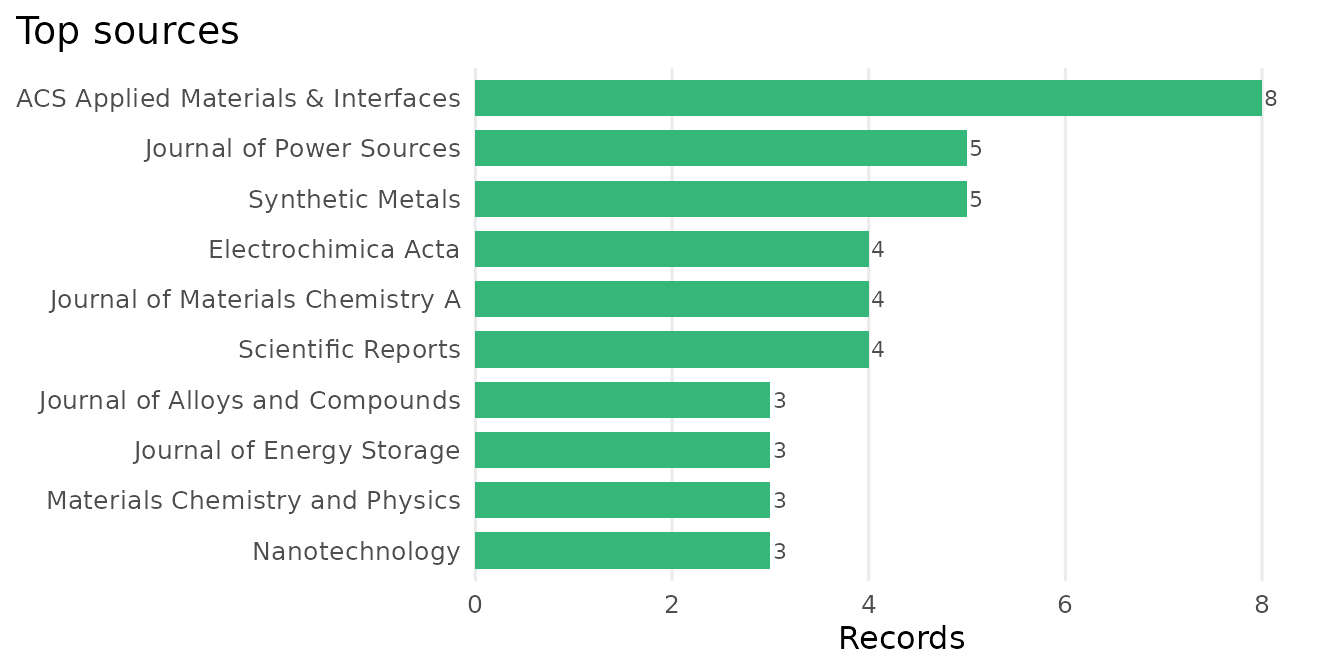
The same plot works on the author tally.
plot_scopus_top(scopus_top(records, by = "author", n = 5))
A record set also has an honest default view. autoplot()
draws its records per year. Because this corpus is a complete harvest of
one query, those bars are the real number of publications per year for
that query. For a harvest of your own, the bars cover the years its plan
searched, a year without records drawn as a zero bar and a year no cell
searched left out. When the years reach the year of the harvest, the
caption says that year was incomplete when the records were retrieved,
since ‘Scopus’ goes on indexing a year’s publications after it has
begun. The same autoplot() generic dispatches on
scopus_trend and scopus_top objects too,
delegating to the plots above.
ggplot2::autoplot(records)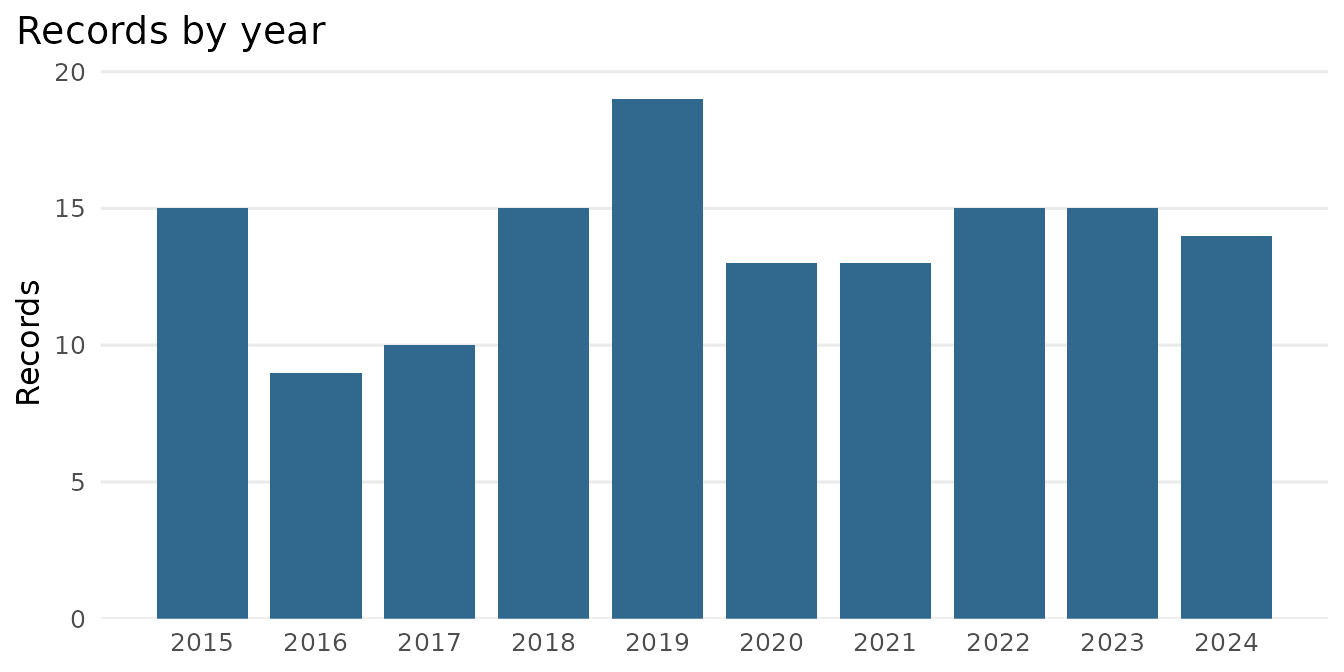
How a literature grows
scopus_trend() counts how many records match a query in
each year, which is the size of a literature over time. It issues one
count request per year, so it needs the API.
tr <- scopus_trend('"graphene supercapacitor"', years = 2015:2024,
                   field = "TITLE-ABS-KEY")
plot_scopus_trend(tr)
The offline equivalent costs no requests at all. A complete harvest
already contains its own yearly counts, and the bundled corpus is a
complete harvest of OpenAlex’s exact-phrase search for the same phrase.
Tallying its records by year therefore gives the yearly counts of that
search, in the shape scopus_trend() returns. A Scopus count
would give different figures, since the two databases do not index the
same records and the Scopus query also searches keywords and every
document type.
by_year <- table(records$year)
tr <- tibble::tibble(
  query = 'TITLE-ABS-KEY("graphene supercapacitor")',
  year  = as.integer(names(by_year)),
  n     = as.numeric(by_year)
)
class(tr) <- c("scopus_trend", class(tr))
tr| query | year | n |
|---|---|---|
| TITLE-ABS-KEY("graphene supercapacitor") | 2015 | 15 |
| TITLE-ABS-KEY("graphene supercapacitor") | 2016 | 9 |
| TITLE-ABS-KEY("graphene supercapacitor") | 2017 | 10 |
| TITLE-ABS-KEY("graphene supercapacitor") | 2018 | 15 |
| TITLE-ABS-KEY("graphene supercapacitor") | 2019 | 19 |
| TITLE-ABS-KEY("graphene supercapacitor") | 2020 | 13 |
| TITLE-ABS-KEY("graphene supercapacitor") | 2021 | 13 |
| TITLE-ABS-KEY("graphene supercapacitor") | 2022 | 15 |
| TITLE-ABS-KEY("graphene supercapacitor") | 2023 | 15 |
| TITLE-ABS-KEY("graphene supercapacitor") | 2024 | 14 |
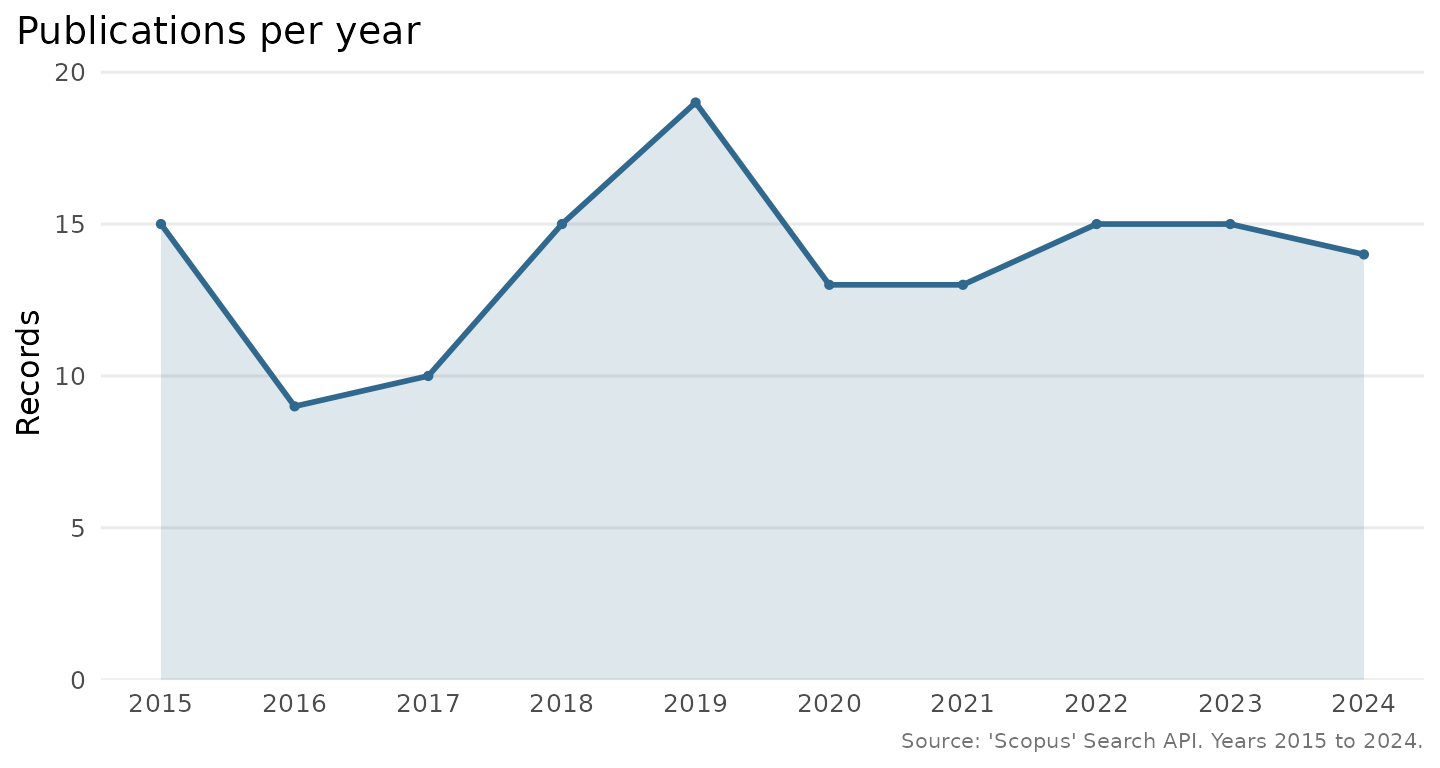
The figure draws the same counts as the bar chart above, and the
agreement is worth noticing. A trend is something a record set already
knows, and something scopus_trend() can find out for a
query whose records you never download. The caption is the function’s
own attribution, since a scopus_trend object ordinarily
comes from the Search API, whereas this one was tallied from the bundled
stand-in. The curve itself is flat because the query is a narrow phrase,
some fifteen papers a year over a decade. The quotation marks keep it
narrow, since Scopus joins the words of an unquoted phrase with AND, and
in OpenAlex the two words unquoted match about a hundred times as many
records. A broader query, ‘graphene’ on its own, would show the steep
growth the field is better known for, on a scale that runs into the
offset ceiling discussed below.
Where a niche sits
A study that crosses two or more fields is best introduced by sizing
those fields and their overlap. Each parent literature may hold
thousands of records while their intersection holds a handful, which is
the niche the study occupies. scopus_intersections() counts
a named set of concepts and any requested intersections of them, at one
count request per row, so the whole landscape is as cheap as a few
scopus_count() calls. Concept values may be bare terms,
wrapped in field for you, or complete field-tagged
expressions, used exactly as given.
sets <- scopus_intersections(
  concepts = c(
    "semantic priming"  = "semantic priming",
    "mental simulation" = "mental simulation",
    # A synonym set, given as a complete expression and used exactly as given.
    "embodied simulation" =
      'TITLE-ABS-KEY("mental simulation") OR TITLE-ABS-KEY("embodied simulation")'
  ),
  intersections = list(c("semantic priming", "mental simulation")),
  field = "TITLE-ABS-KEY"
)
plot_scopus_intersections(
  sets,
  highlight = sets$label[sets$type == "intersection"]
)
Here field leaves the third value untouched, since it
already reads as a complete field-tagged expression, so a concept can be
a whole synonym set.
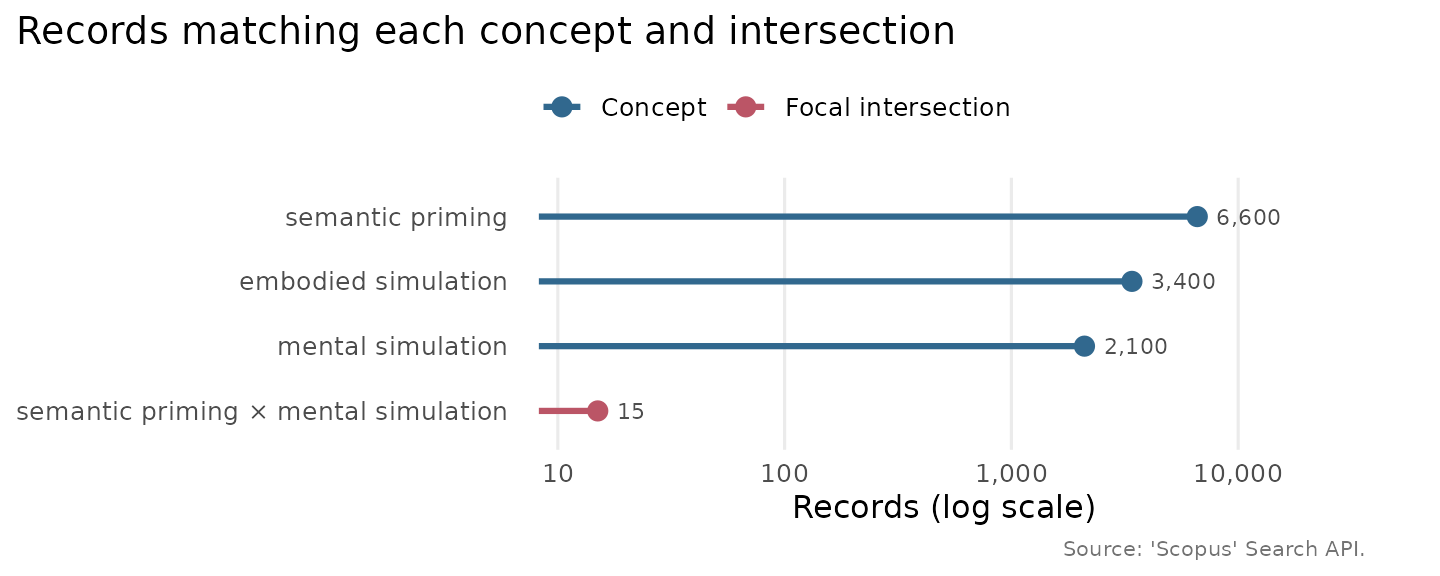
This one cannot be derived from a record set, because it counts whole literatures, where a record set holds only the records already in hand, so here the result is rebuilt in its own shape with illustrative counts, purely to show the plot. The lollipop chart uses a log-scale axis, so the small intersection stays legible beside its large parent fields, and the highlighted row draws the eye to the niche itself.
sets <- tibble::tibble(
  label = c("semantic priming", "mental simulation", "embodied simulation",
            "semantic priming × mental simulation"),
  query = c("TITLE-ABS-KEY(semantic priming)",
            "TITLE-ABS-KEY(mental simulation)",
            'TITLE-ABS-KEY("mental simulation") OR TITLE-ABS-KEY("embodied simulation")',
            "(TITLE-ABS-KEY(semantic priming)) AND (TITLE-ABS-KEY(mental simulation))"),
  n = c(6600, 2100, 3400, 15),
  type = c("concept", "concept", "concept", "intersection"),
  size = c(1L, 1L, 1L, 2L),
  members = c("semantic priming", "mental simulation", "embodied simulation",
              "semantic priming; mental simulation")
)
class(sets) <- c("scopus_intersections", class(sets))
plot_scopus_intersections(
  sets,
  highlight = sets$label[sets$type == "intersection"]
)
Reading the fuller record
The Search API returns a few fields per record. To read the abstract
and the fuller metadata for a record you already know,
scopus_abstract() calls the Abstract Retrieval API, by DOI
or ‘Scopus’ identifier. A batch is resilient, so an identifier that
cannot be found yields a row of NAs with a warning rather
than stopping the run.
ab <- scopus_abstract(head(scopus_extract_dois(records), 2))The result is a tibble of class scopus_abstracts, one
row per identifier. To show its shape without a key, here is a stand-in
built from the two most-cited records of the corpus, which supplies
every column but the abstract and the ‘Scopus’ identifier. Those two are
what a live call adds and the corpus does not carry, so the abstract is
marked as a placeholder and the identifier left as NA, with
nothing invented to fill either, and the columns are listed by name
because the prose is far too wide to typeset.
top2 <- records[order(-records$citations), ][1:2, ]
ab <- tibble::tibble(
  id          = top2$doi,
  scopus_id   = NA_character_,
  doi         = top2$doi,
  title       = top2$title,
  abstract    = "<abstract text, as the API returns it>",
  publication = top2$publication,
  year        = top2$year,
  citations   = top2$citations
)
class(ab) <- c("scopus_abstracts", class(ab))
names(ab)
[1] "id" "scopus_id" "doi" "title" "abstract"
[6] "publication" "year" "citations"
ab[, c("title", "publication", "year", "citations")]| title | publication | year | citations |
|---|---|---|---|
| Graphene for batteries, supercapacitors and beyond | Nature Reviews Materials | 2016 | 1247 |
| Flexible and Stackable Laser-Induced Graphene Supercapacitors | ACS Applied Materials & Interfaces | 2015 | 469 |
Beyond five thousand records
A single Search API query returns at most its first 5000 records
under the ordinary offset paging. When you need the whole of a larger
result set in one pass, scopus_fetch(cursor = TRUE) follows
the API’s cursor instead, which has no such ceiling.
recs <- scopus_fetch("TITLE-ABS-KEY(microplastics)", cursor = TRUE)
nrow(recs)
That query matched 38,374 records when this article was written (the
literature keeps growing), several times the offset ceiling, and the
cursor retrieves all of them in one call. The records then arrive in the
API’s deep-paging order, which is the right trade for a complete harvest
and the wrong one when you want the most relevant few hundred. This is
the one-call alternative to the year-partitioned plan in the Search
plans and quota-aware retrieval article. A plan keeps each cell
under the ceiling and preserves relevance order, whereas
cursor = TRUE harvests the whole set in a single pass.
Reach for the plan when you want cached, resumable cells and the cursor
when you want the complete set at once.
scopus_fetch_plan(plan, cursor = TRUE) gives both, at the
cost of the deep-paging order.