Dutch modality exclusivity norms
Web application


Abstract
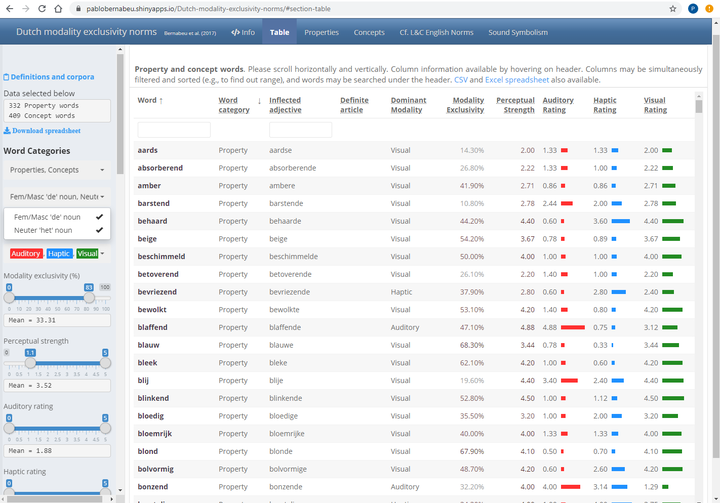
This app presents linguistic data over several tabs. It combines the R Markdown-based user interface of Flexdashboard with a Shiny back-end that lets users download the data they select as CSV files and the plots as PNG images. One of the hardest nuts to crack was changing the orientation of rows and columns without breaking the reactable tables. Flexdashboard also made it possible to use quite different formats in different tabs.
This web application (Bernabeu, 2018) presents linguistic data over several tabs. The code combines a Flexdashboard front-end, based on R Markdown and offering an excellent user interface, with a Shiny back-end that lets users download the data they select as CSV files and the plots as PNG images. The data, the analysis code and the application code are archived on Zenodo (Bernabeu, 2024).
How It Works
The diagram below shows how the data pass from the Flexdashboard front-end through the Shiny back-end to each tab, and how the static version branches off from the front-end.
exclusivity norms data"] --> B["Flexdashboard front-end
(R Markdown)"] B --> C["Shiny back-end
(reactive selection and download)"] C --> D["Info tab: HTML and CSS text
plus rmarkdown output"] C --> E["Table tab: reactable
(colours, bar charts)"] C --> F["Properties and Concepts tabs: plotly
(principal component scatter plots,
tooltips)"] B --> G["Static Flexdashboard-only version
on RPubs (Shiny removed)"]
The notes below describe the main steps and difficulties in developing the app, with excerpts from the code.
A nice find was the reactable package, which uses JavaScript to add colours, bar charts and other features to tables.
Auditory = colDef(header = with_tooltip('Auditory Rating',
                                        'Mean rating of each word on the auditory modality across participants.'),
                  cell = function(value) {
                    width <- paste0(value / max(table_data$Auditory) * 100, "%")
                    value = sprintf("%.2f", round(value,2))  # Round to two digits, keeping trailing zeros
                    bar_chart(value, width = width, fill = '#ff3030')
                    },
                  align = 'left'),
One of the hardest nuts to crack was keeping the full functionality of the tables (scaling to the screen, a frozen header, and vertical and horizontal scrolling) after changing the orientation of the dashboard sections. The initial clashes were resolved by adjusting the CSS styles of the section
Table {#table style="background-color:#FCFCFC;"}
=======================================================================

Inputs {.sidebar style='position:fixed; padding-top: 65px; padding-bottom:30px;'}
-----------------------------------------------------------------------
and the settings of reactable.
renderReactable({
  reactable(selected_words(),
            defaultSorted = list(cat = 'desc', word = 'asc'),
            defaultColDef = colDef(footerStyle = list(fontWeight = "bold")),
            height = 840, striped = TRUE, pagination = FALSE, highlight = TRUE,
Flexdashboard is well suited to using different formats across tabs. The Info tab presents long text styled with HTML and CSS, along with the output of R Markdown code. The other tabs rely more on JavaScript features from R packages, with shiny and shinyWidgets providing modal dialogues (pop-ups), and reactable and plotly displaying information on hover (tooltips).
```{r}

# reactive for the word bar
highlighted_properties = reactive(input$highlighted_properties)

renderPlotly({
  ggplotly(
    ggplot( selected_props(), aes(RC1, RC2, label = as.character(word), color = main,
                                  # Html tags below used for format. Decimals rounded to two.
                                  text = paste0(' ', '<span style="padding-top:3px; padding-bottom:3px; font-size:2.2em; color:#EEEEEE">', capitalize(word), '</span> ', '<br>',
                                                '</b><br><span style="color:#EEEEEE"> Dominant modality: </span><b style="color:#EEEEEE">', main, ' ',
                                                ' ', '</b><br><span style="color:#EEEEEE"> Modality exclusivity: </span><b style="color:#EEEEEE">', sprintf("%.2f", round(Exclusivity, 2)), '% ',
                                                '</b><br><span style="color:#EEEEEE"> Perceptual strength: </span><b style="color:#EEEEEE">', sprintf("%.2f", round(Perceptualstrength, 2)),
                                                '</b><br><span style="color:#EEEEEE"> Auditory rating: </span><b style="color:#EEEEEE">', sprintf("%.2f", round(Auditory, 2)), ' ',
                                                '</b><br><span style="color:#EEEEEE"> Haptic rating: </span><b style="color:#EEEEEE">', sprintf("%.2f", round(Haptic, 2)), ' ',
                                                '</b><br><span style="color:#EEEEEE"> Visual rating: </span><b style="color:#EEEEEE">', sprintf("%.2f", round(Visual, 2)), ' ',
                                                '</b><br><span style="color:#EEEEEE"> Concreteness (Brysbaert et al., 2014): </span><b style="color:#EEEEEE">',
                                                sprintf("%.2f", round(concrete_Brysbaertetal2014, 2)), ' ',
                                                '</b><br><span style="color:#EEEEEE"> Number of letters: </span><b style="color:#EEEEEE">', letters, ' ',
                                                '</b><br><span style="color:#EEEEEE"> Number of phonemes (DutchPOND): </span><b style="color:#EEEEEE">',
                                                round(phonemes_DUTCHPOND, 2), ' ',
                                                '</b><br><span style="color:#EEEEEE"> Contextual diversity (lg10CD SUBTLEX-NL): </span><b style="color:#EEEEEE">',
                                                sprintf("%.2f", round(freq_lg10CD_SUBTLEXNL, 2)), ' ',
                                                '</b><br><span style="color:#EEEEEE"> Word frequency (lg10WF SUBTLEX-NL): </span><b style="color:#EEEEEE">',
                                                sprintf("%.2f", round(freq_lg10WF_SUBTLEXNL, 2)), ' ',
                                                '</b><br><span style="color:#EEEEEE"> Lemma frequency (CELEX): </span><b style="color:#EEEEEE">',
                                                sprintf("%.2f", round(freq_CELEX_lem, 2)), ' ',
                                                '</b><br><span style="color:#EEEEEE"> Phonological neighbourhood size (DutchPOND): </span><b style="color:#EEEEEE">',
                                                round(phon_neighbours_DUTCHPOND, 2), ' ',
                                                '</b><br><span style="color:#EEEEEE"> Orthographic neighbourhood size (DutchPOND): </span><b style="color:#EEEEEE">',
                                                round(orth_neighbours_DUTCHPOND, 2), ' ',
                                                '</b><br><span style="color:#EEEEEE"> Age of acquisition (Brysbaert et al., 2014): </span><b style="color:#EEEEEE">',
                                                sprintf("%.2f", round(AoA_Brysbaertetal2014, 2)), ' ', '<br> '
                                  ) ) ) +
      geom_text(size = ifelse(selected_props()$word %in% highlighted_properties(), 7,
                              ifelse(is.null(highlighted_properties()), 3, 2.8)),
                fontface = ifelse(selected_props()$word %in% highlighted_properties(), 'bold', 'plain')) +
      geom_point(alpha = 0) +  # This geom_point helps to colour the tooltip according to the dominant modality
      scale_colour_manual(values = colours, drop = FALSE, name = '') +
      ggtitle('Property words') +
      labs(x = 'Varimax-rotated Principal Component 1', y = 'Varimax-rotated Principal Component 2') +
      theme_bw() +
      theme( plot.background = element_blank(), panel.grid.major = element_blank(),
             panel.grid.minor = element_blank(), panel.border = element_blank(),
             axis.line = element_line(color = 'black'), plot.title = element_text(size = 14, hjust = .5),
             axis.title.x = element_text(colour = 'black', size = 12, margin = margin(15,15,0,15)),
             axis.title.y = element_text(colour = 'black', size = 12, margin = margin(0,15,15,5)),
             axis.text.x = element_text(size = 8), axis.text.y = element_text(size = 8),
             legend.background = element_rect(linewidth = 2),
             legend.title = element_blank(),
             legend.text = element_text(colour = colours, size = 13) ),
    tooltip = 'text'
  )
})


# For download, save plot without the interactive 'plotly' part

properties_png = reactive({ ggplot(selected_props(), aes(RC1, RC2, color = main, label = as.character(word))) +
    geom_text(show.legend = FALSE, size = ifelse(selected_props()$word %in% highlighted_properties(), 7,
                                                 ifelse(is.null(highlighted_properties()), 3, 2.8)),
              fontface = ifelse(selected_props()$word %in% highlighted_properties(), 'bold', 'plain')) +
    geom_point(alpha = 0) + scale_colour_manual(values = colours, drop = FALSE) + theme_bw() +
    guides(color = guide_legend(title = 'Main<br>modality', override.aes = list(size = 7, alpha = 1))) +
    ggtitle( paste0('Properties', ' (showing ', nrow(selected_props()), ' out of ', nrow(props), ')') ) +
    labs(x = 'Varimax-rotated Principal Component 1', y = 'Varimax-rotated Principal Component 2') +
    theme( plot.background = element_blank(), panel.grid.major = element_blank(),
           panel.grid.minor = element_blank(), panel.border = element_blank(),
           axis.line = element_line(color = 'black'), plot.title = element_text(size = 17, hjust = .5, margin = margin(3,3,7,3)),
           axis.title.x = element_text(colour = 'black', size = 12, margin = margin(10,10,2,10)),
           axis.title.y = element_text(colour = 'black', size = 12, margin = margin(10,10,10,5)),
           axis.text.x = element_text(size = 8), axis.text.y = element_text(size = 8),
           legend.background = element_rect(linewidth = 2), legend.position = 'right',
           legend.title = element_blank(), legend.text = element_text(size = 15))
})

```
The only JavaScript I wrote myself, outside the R packages, enabled tooltips in places the packages could not reach, such as the sidebar. This function is defined in the head area at the top of the script.
<!-- Javascript function to enable a hovering tooltip -->
<script>
$(document).ready(function(){
   $('[data-toggle="tooltip1"]').tooltip();
});
</script>
In the sidebar, I added a reactive mean for each variable to accompany the range selector.
reactive(cat(paste0('Mean = ',
  sprintf("%.2f", round(mean(selected_words()$Exclusivity),2)))))
Static Version Published on RPubs
A reduced, static version makes the content more widely available. Without some of the reactive features, the dashboard can be published as a standard website (e.g., on a personal website or on RPubs) with no need for a Shiny server. Although this type of website is called ‘static’, it can keep many interactive features through JavaScript-based R packages such as leaflet for maps, DT for tables and plotly for plots.
To create the Flexdashboard-only version from the Flexdashboard-Shiny version, I deleted runtime: shiny from the YAML header and disabled the Shiny reactive inputs and objects, as shown below.
```{r}
# Number of words selected on sidebar
# reactive(cat(paste0('Words selected below: ', nrow(selected_props()))))
```
References
Bernabeu, P. (2018). Dutch modality exclusivity norms for 336 properties and 411 concepts [Web application]. https://pablobernabeu.shinyapps.io/Dutch-modality-exclusivity-norms/
Bernabeu, P. (2024). Dutch-modality-exclusivity-norms-Bernabeu-2018 (Version 1.0.0) [Computer software]. Zenodo. https://doi.org/10.5281/zenodo.10615944
Comments are provided by Disqus and are not loaded automatically. Loading them connects your browser to Disqus, which may use cookies and process data under its privacy policy. See this site's privacy notice for details.